Short videos for social media
Vertical 9:16 clips for TikTok, Reels and Shorts.
Deepnia’s AI video generator creates a short video from a text description, or animates an image you upload. Depending on the model, you can also set a start image and an end image, or guide the video with reference images. Several video models are gathered in the same space, and the exact cost is shown before every creation. Your videos stay in My media, ready to download, merge or publish on your social accounts.
These videos come straight out of the generator, with no editing, and the prompt and model next to each one. They play here without sound.
Text to video · 5 s
An empty plot by the sea becomes a white villa with a pool, filmed as a drone time-lapse.
Text to video · 5 s
Tiny workers in orange vests build a giant burger on a kitchen board.
Text to video · 5 s
A knife slowly slices a transparent glass kiwi, in extreme close-up.
Text to video · 5 s
A cartoon orange cat dives from a springboard into a pool in slow motion, cheered on by other animals.
Text to video · 5 s
A baby capybara relaxes in a hot spring in the snow, an orange on its head.
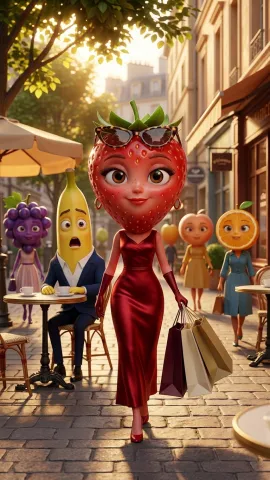
Image to video · 5 s
From a still image, a strawberry character in a red dress walks forward in slow motion, lowers her sunglasses and winks.
The subject, the action, the setting and the camera movement: write what should happen, as you would tell a director.
Optional: a photo to animate, a start and an end image, or references to keep a product or a character, depending on the model.
Choose the format, the duration and the quality, check the cost shown, then generate. The video lands in My media.
Models differ in duration, image quality, realism of movement and whether they make sound. You pick yours from the tool’s menu, and each one has its own detailed page.
Vertical 9:16 clips for TikTok, Reels and Shorts.
Put a product in motion from its photo, for an ad or a story.
Bring a photo to life: a glance, a gesture, a moving background.
Wide shots, camera moves and atmospheres for your films and clips.
Go from a start image to an end image in one continuous movement, depending on the model.
Create several shots, then join them into one video with the Video merger tool.
Open the generator, describe the scene and the movement, choose the format and the duration, then generate. To start from a photo, add it before you generate.
Yes. Upload your image and the model animates it following your description. Some models also take an end image, so you choose where the video lands.
It depends on the model: most make shots of 3 to 30 seconds. For a longer video, create several shots and join them with the Video merger.
Some models also make the video’s sound, others deliver a silent video: pick the model that fits your need.
Depending on the model: vertical 9:16, square 1:1, landscape 16:9 and up to the 21:9 cinema format.
Information checked on October 9, 2026.